#Powershell Magic Back once again with the Powershell 🥓 flavour

Published 2025-11-23

#Been a while 🐊

So I know it has been sometime since my last blog. I do apologise to my fellow readers, just been busy with life, and wanting to keep life as peaceful as possible. As it seems even doing the right thing can be the wrong thing to do. Or certainly has felt like that a lot lately.

Hmmm do I fix it and get in trouble again, or do I not fix it and get into trouble for not fixing it? If only my super-power was seeing the future I would know which choices to make

However I have done a small MC session on PowerShell which if Microsoft want to sponser me to get this into the top 10 in the charts, lets make it happen. Spreading the coding vibes here:

#Puppies have all gone

Also had the dilemma of trying to find the puppies homes to go to. Like honestly I thought as they were 100% pure Shar-Pei pups they would sell in an instant, but that was not the case. I know my mrs spent over 200 just on advertising them. Thankfully they have all gone to really good homes which makes me very happy. As it had also cost me a load in vet bills for the pups as I had mentioned in my previous blogs.

So I sold 6 puppies in total and 5 of the 6 puppies went to previous Shar-Pei owners which I thought was quite mad, maybe that is why I had such a tough time trying to find them nice new homes, due to the breed being quite specific. Like if you look on the internet Shar-Pei dogs do not seem to get the credit I think they deserve and negativity about them not being a good dog for first time dog-buyers. Just mad how where I live everyone seems to have a Cockapoo dog, which to me is just a mut breed and the majority of those seem to be really vicious little muts, but the owners are always so unapologetic, but sure if the tables were turned as in my Shar-Pei was being aggressive it would all kick off. Thankfully this is never the case as all my 4 dogs are really chilled.

#Behringer CZ-1 Mini
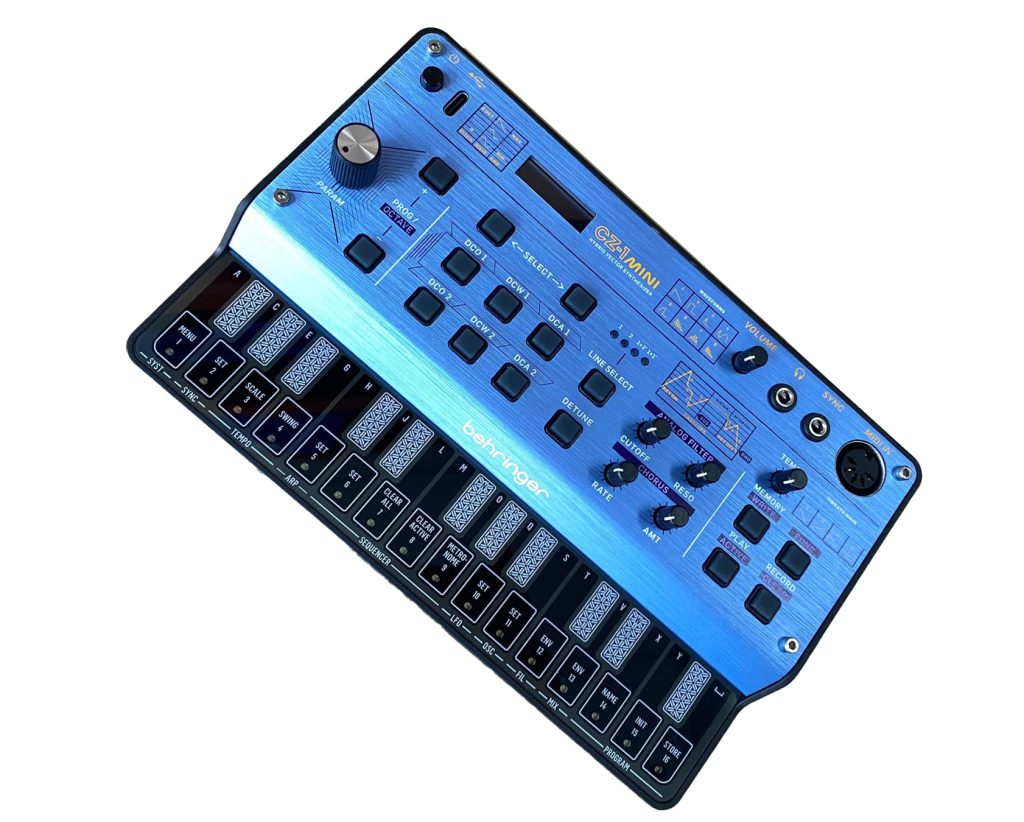
I ended up impulse buying this device thinking it could do stuff it did not do. Which will be covered shortly.

So I been getting really into making my own music on portable synths I have been purchasing for about the best part of a year. Recently I saw that the Behringer CZ-1 mini had been released and well the sound it produced on the youtube videos I had watched was enough for me to impulse buy this synth.

It had pretty much just been released less than a month ago, and a lot of resellers were not getting stock until February 2026. When I saw a reseller had them in stock I just had to buy one.

So I knew for the price I was paying this was going to be a very basic model, however I did assume that it could do a little more than what it can actually do. Like even the mini calculator Pocket Operators I have bought had the ability to chain patterns together, and although I can make music, I am not good enough to play it live. This is what I felt the Behringer CZ-1 mini was more geared towards, as well you can only store a 16 part pattern, and there is no pattern chaining of the music you make.

So although the sounds on this device are amazing, and you can also load new sysex patch sounds into it, giving you the possibilites of 1000s of different sounds, although limited to 16 at a time. It seemed to lack basic things I expected it would have done.

This then gave me the idea as it is powered by USB then surely as midi-ox could communicate with this device then there must have been someway to do this using PowerShell. I then embarked on a journey to make this a reality. Although sadly I never accomplished the main goal which was to pre-program a pattern chaning sequence I stumbled on something just as good.

True there was nothing on the PowerShell gallery but searching deeper into making this happen led me to https://www.nuget.org/ which contained several MIDI dll packages. This is what makes a binary module in PowerShell.

I ended up using these 3 different DLLs to make functions to allow me to make more use of the Behringer CZ-1 mini:

  • NAudio.Core.dll
  • NAudio.Midi.dll
  • DryWetMIDI.dll

I did create a youtube video to show this in action, and here is the script I used, which holds two main functions. The first function allows me to send a midi file to be read and played by the behringer at the BPM, also allowing you to delay the start time of the of when the midi start to play, and the amount of beats per bar. The second function allows me to automatically change the sound selected on the Behringer CZ-1 mini.

The code outside of these functions is literally calling the functions, specifying the sound to play to each midi file I want played, then at the end cleanup the midi devices.

ps1
# Load DLLs Add-Type -Path "C:\Music\CZ-1\NAudio.Core.dll" Add-Type -Path "C:\Music\CZ-1\NAudio.Midi.dll" Add-Type -Path "C:\Music\CZ-1\DryWetMIDI.dll" function Invoke-Midi { param ( [NAudio.Midi.MidiOut]$Device1, # e.g. CZ-1 [NAudio.Midi.MidiOut]$Device2, # e.g. P-6 [int]$BPM = 120, [string]$MidiFilePath, [int]$StartOffset = 0, # delay in bars before CZ-1 plays [int]$BeatsPerBar = 4 # default 4/4 time ) if (-not (Test-Path $MidiFilePath)) { Write-Warning "MIDI file not found: $MidiFilePath" return } # Calculate tick timing $msPerTick = 60000 / ($BPM * 24) # Calculate offset ticks from bars $cz1StartOffsetTicks = $StartOffset * $BeatsPerBar * 24 # Load MIDI notes $midiFile = [Melanchall.DryWetMidi.Core.MidiFile]::Read($MidiFilePath) $ticksPerQuarterNote = $midiFile.TimeDivision.TicksPerQuarterNote $notes = [Melanchall.DryWetMidi.Interaction.NotesManagingUtilities]::GetNotes($midiFile) # Normalize timing to start at tick 0 $minTime = ($notes | Measure-Object -Property Time -Minimum).Minimum # Convert notes to MIDI Clock tick schedule $noteData = foreach ($note in $notes) { $relativeTime = $note.Time - $minTime $startTick = [math]::Round(($relativeTime / $ticksPerQuarterNote) * 24) $durationTicks = [math]::Round(($note.Length / $ticksPerQuarterNote) * 24) [PSCustomObject]@{ NoteNumber = $note.NoteNumber Velocity = $note.Velocity Channel = $note.Channel StartTick = $startTick DurationTicks = $durationTicks } } $noteData = $noteData | Sort-Object StartTick # Send MIDI Start $Device1.Send(0xFA) $Device2.Send(0xFA) # Start clock and playback $sw = [System.Diagnostics.Stopwatch]::StartNew() $tickCount = 0 $noteIndex = 0 while ($noteIndex -lt $noteData.Count -or $pendingNotes.Count -gt 0) { $tickStart = $sw.Elapsed.TotalMilliseconds $Device2.Send(0xF8) # send clock $tickCount++ $pendingNotes = @() # Trigger notes while ($noteIndex -lt $noteData.Count -and $noteData[$noteIndex].StartTick -le $tickCount) { $note = $noteData[$noteIndex] # Only send CZ-1 notes after offset ticks if ($tickCount -ge $cz1StartOffsetTicks) { #Write-Host "Tick $tickCount : CZ-1 NoteOn $($note.NoteNumber) Velocity $($note.Velocity) DurationTicks $($note.DurationTicks)" $noteOn = [NAudio.Midi.MidiMessage]::StartNote($note.NoteNumber, $note.Velocity, 1).RawData $Device1.Send($noteOn) # Schedule note off $noteOffTick = $tickCount + $note.DurationTicks $pendingNotes += [PSCustomObject]@{ NoteNumber = $note.NoteNumber NoteOff = [NAudio.Midi.MidiMessage]::StopNote($note.NoteNumber, $note.Velocity, 1).RawData Tick = $noteOffTick } } $noteIndex++ } # Trigger pending note offs $toRemove = @() foreach ($n in $pendingNotes) { if ($tickCount -ge $n.Tick) { Write-Host "Tick $tickCount : CZ-1 NoteOff triggered" $Device1.Send($n.NoteOff) $toRemove += $n } } $pendingNotes = $pendingNotes | Where-Object { $toRemove -notcontains $_ } # Wait until next tick do { $tickNow = $sw.Elapsed.TotalMilliseconds } while (($tickNow - $tickStart) -lt $msPerTick) } # Flush any remaining NoteOffs foreach ($n in $pendingNotes) { $noteOffMsg = [NAudio.Midi.MidiMessage]::StopNote($n.NoteNumber, $n.Velocity, 1).RawData Write-Host "Final cleanup: CZ-1 NoteOff for note $($n.NoteNumber)" $midiOutCZ1.Send($noteOffMsg) } $pendingNotes = @() # Send MIDI Stop $Device1.Send(0xFC) $Device2.Send(0xFC) } function Set-CZ1Sound { param( [int]$channel = 0, # 0 = MIDI channel 1 [int]$program = 0, # 0 = pattern number 1 [NAudio.Midi.MidiOut]$CZ1 ) $status = 0xC0 -bor $channel $message = $status -bor ($program -shl 8) $CZ1.Send($message) Write-Host "Sent Sound Change: Channel $($channel+1), Program $program" } # Open devices $midiOutCZ1 = [NAudio.Midi.MidiOut]::new(1) # CZ-1 Mini $midiOutP6 = [NAudio.Midi.MidiOut]::new(2) # Roland P-6 Compact $files = @( "C:\music\airwolf\airwolf1.mid", "C:\music\airwolf\airwolf2.mid" ) # Invoke playback Set-CZ1Sound -program 14 -CZ1 $midiOutCZ1 Invoke-Midi -Device1 $midiOutCZ1 -Device2 $midiOutP6 -BPM 135 -MidiFilePath $files[0] -StartOffset 4 Set-CZ1Sound -program 8 -CZ1 $midiOutCZ1 Invoke-Midi -Device1 $midiOutCZ1 -Device2 $midiOutP6 -BPM 135 -MidiFilePath $files[1] -StartOffset 1 # Cleanup afterwards $midiOutCZ1.Dispose() $midiOutP6.Dispose()
1
2
3
4
5
6
7
8
9
10
11
12
13
14
15
16
17
18
19
20
21
22
23
24
25
26
27
28
29
30
31
32
33
34
35
36
37
38
39
40
41
42
43
44
45
46
47
48
49
50
51
52
53
54
55
56
57
58
59
60
61
62
63
64
65
66
67
68
69
70
71
72
73
74
75
76
77
78
79
80
81
82
83
84
85
86
87
88
89
90
91
92
93
94
95
96
97
98
99
100
101
102
103
104
105
106
107
108
109
110
111
112
113
114
115
116
117
118
119
120
121
122
123
124
125
126
127
128
129
130
131
132
133
134
135
136
137
138
139
140
141

#Something to share

Still not feeling the lacking of abilities of the CZ-1 mini makes it easy enough to use in the sets I make. Here is a recent video of some nice retro sythwave sounds, I hope you enjoy 🎵