Do not be overwhelmed if you got to this page expecting to automatically find the answer to your problem. See I believe you do not learn in life if you get others to do the work.
So if your new to PowerShell please stick with it, I speak from the heart that it is 100% worth investing your time to learn how to use PowerShell effectively. As the time you will save in the future automating all the answers to the problems you get assigned will certainly pay off all the hours / days / weeks / months / years it takes you to become a PowerShell hero.
So I do not want to be like the current UK Government promising you a dream, but leaving you in a nightmare scene. I am here today to share a PowerShell function I wrote a while back when I was looking at what jobs were on the market, and which jobs I think I would be a good match for.
It is so upsetting to read peoples stories on LinkedIn, about them trying to find work, as they have been unemployed for a given amount of time, and they are about to loose everything the worked so hard to get, like the roof over their heads.
See I always think you get what you give in life, and although I cannot offer employment to anyone I can give you a smarter faster way to find the job you are after. This only applies to people living in the United Kingdom, but if you are not living in the UK I am sure there will be an equivalent website in your country which will allow you to do the same thing I am about to share.
Yep that is right we are going to combine the powers of Powershell and an API to get us results for jobs faster than you would be able to do pointing and clicking. So before I ramble on too much let us just clear up what an API is and what you can do with one.
Read for a better understanding on what an API is, in a non jargon mind bending way
An API (short for Application Programming Interface) is like a waiter/waitesss in a sit-down restaurant. You (the customer) would not go into the kitchen and cook your own food — you inform the waiter/waitress what you want to eat, and they bring it to you from the kitchen once it is ready. The kitchen is the system doing all the work behind the scenes, and the waiter/waitress (the API) is the middle-person that knows how to talk to it. To give back what your wanted.
In tech terms, an API lets one piece of software talk to another. You send a request (like “give me all the job listings for London”), and the API sends back the data you asked for — usually in a format like JSON that’s easy for your code to work with. The speed of this is far quicker than manually browsing for the data
So the first step you will need to complete to follow along is register for an API key which is totally free from: https://developer.adzuna.com/
It only takes a few moments to sign up and obtain a FREE API key to then use to pull back jobs like you have super human speed. The code I am about to share I used with PowerShell 5.1 in Powershell_ISE
function Get-AdzunaJobs {
    <#
    .SYNOPSIS
    Queries the Adzuna job search API to retrieve employment listings based on keyword, location, and result limit.

    .DESCRIPTION
    This function connects to the Adzuna UK job search API using credentials stored in environment variables (`ADZUNA_APP_ID` and `ADZUNA_APP_KEY`).
    It constructs a query URI with URL-encoded parameters, sends a GET request, and returns a sanitized list of job listings as custom PowerShell objects.
    Each listing includes the job title, company name, location, cleaned description, and redirect URL.

    .PARAMETER SearchTerm
    The keyword or phrase to search for in job listings. Defaults to "Infrastructure".

    .PARAMETER Location
    The geographic location to target for job listings. Defaults to "UK".

    .PARAMETER ResultsLimit
    The maximum number of job listings to retrieve. Defaults to 100.

    .EXAMPLE
    Get-AdzunaJobs -SearchTerm "DevOps Engineer" -Location "London" -ResultsLimit 50

    Retrieves up to 50 DevOps Engineer job listings located in London.

    .EXAMPLE
    Get-AdzunaJobs

    Uses default parameters to search for "powershell automation" jobs in the UK, returning up to 100 results.

    .NOTES
    Requires valid Adzuna API credentials stored in environment variables:
    - $env:ADZUNA_APP_ID
    - $env:ADZUNA_APP_KEY

    If credentials are missing, the function will terminate with an error.

    .LINK
    https://developer.adzuna.com/docs/search
    #>
    param(
        [string]$SearchTerm = "Infrastructure",
        [string]$Location = "UK",
        [int]$ResultsLimit = 100
    )
    # YOU NEED TO ENTER YOUR API KEY DETAILS BELOW OR SAVE THEM INTO YOUR POWERSHELL PROFILE LIKE I HAVE
    $app_id = $env:ADZUNA_APP_ID
    $app_key = $env:ADZUNA_APP_KEY

    if (-not $app_id -or -not $app_key) {
        Write-Error "Missing Adzuna credentials."
        return
    }

    # URL Encode parameters
    Add-Type -AssemblyName System.Web
    $encodedSearchTerm = [System.Web.HttpUtility]::UrlEncode($SearchTerm)
    $encodedLocation   = [System.Web.HttpUtility]::UrlEncode($Location)

    $baseUrl = "https://api.adzuna.com/v1/api/jobs/gb/search/1?"
    $queryString = "app_id=$app_id&app_key=$app_key&results_per_page=$ResultsLimit&what=$encodedSearchTerm&where=$encodedLocation&content-type=application/json"
    $uri = "$baseUrl"+"$queryString"

    Write-Host "`nDEBUG URI: $uri`n" -ForegroundColor Yellow

    try {
        $response = Invoke-RestMethod -Uri $uri -Method Get -ErrorAction Stop

        if (-not $response.results) {
            Write-Host "No jobs found matching the criteria."
        } else {
            $response.results | ForEach-Object {
                [PSCustomObject]@{
                    Title       = $_.title
                    Company     = $_.company.display_name
                    Location    = $_.location.display_name
                    Description = ($_.description -replace '<[^>]*>', '') -replace '\s+', ' ' -replace '&[^;]+;', ''
                    URL         = $_.redirect_url
                }
            }
        }
    } catch {
        Write-Error "Failed to fetch job listings: $_"
    }
}
1
2
3
4
5
6
7
8
9
10
11
12
13
14
15
16
17
18
19
20
21
22
23
24
25
26
27
28
29
30
31
32
33
34
35
36
37
38
39
40
41
42
43
44
45
46
47
48
49
50
51
52
53
54
55
56
57
58
59
60
61
62
63
64
65
66
67
68
69
70
71
72
73
74
75
76
77
78
79
80
81
82
83
84
As a synopsis for this code has been provided, you can run
ps1
Get-Help Get-AdzunaJobs -Example
1
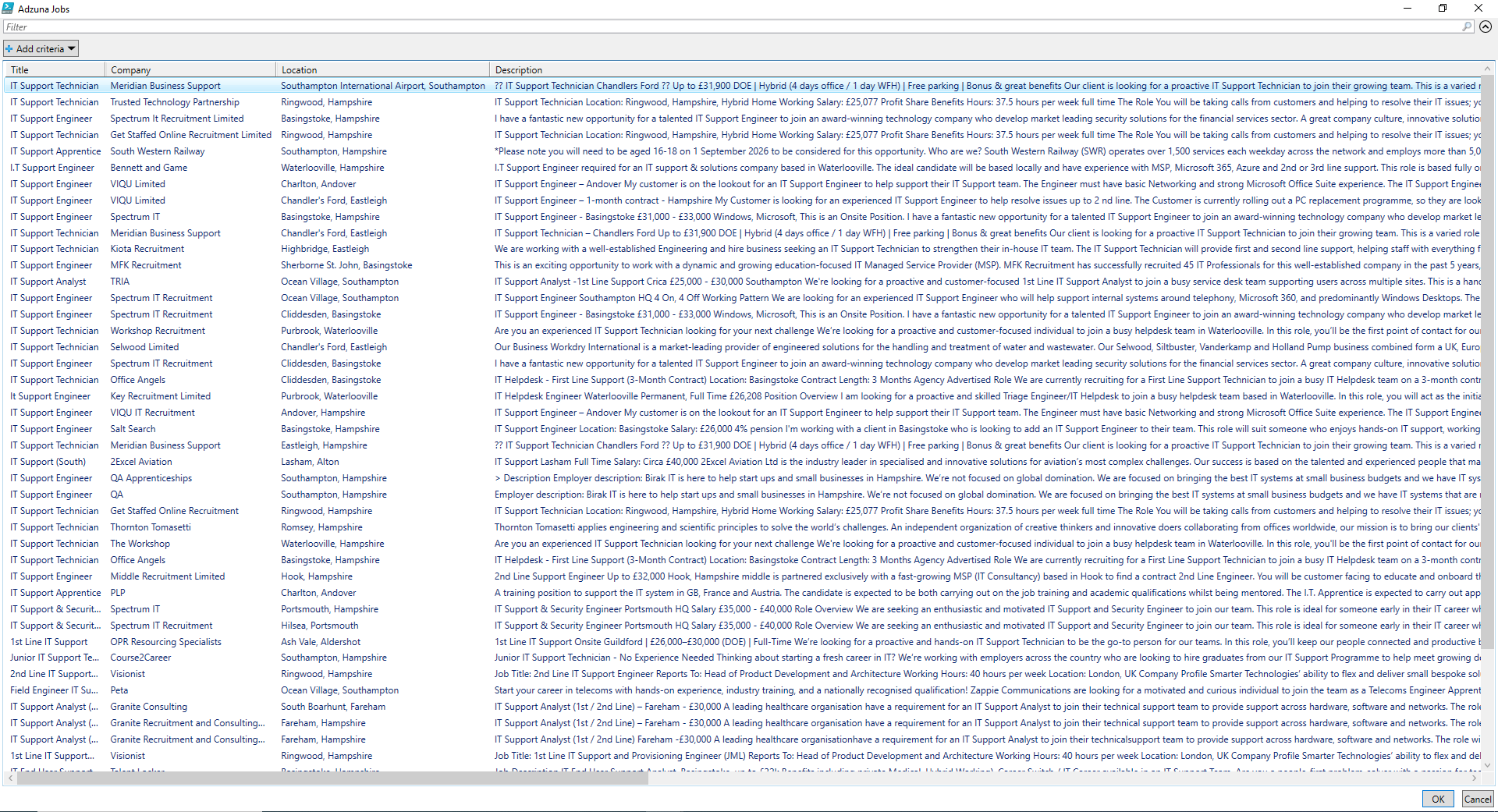
To see how to use it further more you could add the following at the bottom of the function, to automatically call it, then have the results display in an out-gridview letting you easily filter the results to key words, you can then highlight one or more of the results, click the OKAY button which will directly take you to that job listing to apply for it
ps1
$jobsSelected = @()
do {
    $jobs = Get-AdzunaJobs -SearchTerm 'IT Analyst' -Location 'Hampshire' -ResultLimit 100 | Out-GridView -Title "Adzuna Jobs" -PassThru
    if ($jobs) {
        $jobsSelected += $jobs
        Write-Output "You selected: $($jobs.title)"
        Start-Process msedge -ArgumentList "$($jobs.URL)"
    } else {
        break
    }
} while ($true)

Write-Output "You looked at the following jobs:"
$jobsSelected | ForEach-Object { $_.Title;$_.URL;Write-Host "`n" }
1
2
3
4
5
6
7
8
9
10
11
12
13
14
I kid you not, on my laptop I got all the results in less then a second
Finding the right job made easy
Whats also cool about this, it records the jobs you viewed, and outputs these to the console window, keeping the Out-GridView open to view more jobs. This could allow you to maybe save that output from the console for future reference on following up on the jobs you applied for.
To make life even easier, here is all the code you need, you will need to edit the API Secret and ID to match the one you got when signing up for an API on the Adzuna web link provided. Then near the bottom when you call the Get-AdzunaJobs function you just need to edit the parameters to the type of work you are looking for the location and the amount of results.
ps1
function Get-AdzunaJobs {
    <#
    .SYNOPSIS
    Queries the Adzuna job search API to retrieve employment listings based on keyword, location, and result limit.

    .DESCRIPTION
    This function connects to the Adzuna UK job search API using credentials stored in environment variables (`ADZUNA_APP_ID` and `ADZUNA_APP_KEY`).
    It constructs a query URI with URL-encoded parameters, sends a GET request, and returns a sanitized list of job listings as custom PowerShell objects.
    Each listing includes the job title, company name, location, cleaned description, and redirect URL.

    .PARAMETER SearchTerm
    The keyword or phrase to search for in job listings. Defaults to "Infrastructure".

    .PARAMETER Location
    The geographic location to target for job listings. Defaults to "UK".

    .PARAMETER ResultsLimit
    The maximum number of job listings to retrieve. Defaults to 100.

    .EXAMPLE
    Get-AdzunaJobs -SearchTerm "DevOps Engineer" -Location "London" -ResultsLimit 50

    Retrieves up to 50 DevOps Engineer job listings located in London.

    .EXAMPLE
    Get-AdzunaJobs

    Uses default parameters to search for "powershell automation" jobs in the UK, returning up to 100 results.

    .NOTES
    Requires valid Adzuna API credentials stored in environment variables:
    - $env:ADZUNA_APP_ID
    - $env:ADZUNA_APP_KEY

    If credentials are missing, the function will terminate with an error.

    .LINK
    https://developer.adzuna.com/docs/search
    #>
    param(
        [string]$SearchTerm = "Infrastructure",
        [string]$Location = "UK",
        [int]$ResultsLimit = 100
    )

    $app_id = $env:ADZUNA_APP_ID
    $app_key = $env:ADZUNA_APP_KEY

    if (-not $app_id -or -not $app_key) {
        Write-Error "Missing Adzuna credentials."
        return
    }

    # URL Encode parameters
    Add-Type -AssemblyName System.Web
    $encodedSearchTerm = [System.Web.HttpUtility]::UrlEncode($SearchTerm)
    $encodedLocation   = [System.Web.HttpUtility]::UrlEncode($Location)

    $baseUrl = "https://api.adzuna.com/v1/api/jobs/gb/search/1?"
    $queryString = "app_id=$app_id&app_key=$app_key&results_per_page=$ResultsLimit&what=$encodedSearchTerm&where=$encodedLocation&content-type=application/json"
    $uri = "$baseUrl"+"$queryString"

    Write-Host "`nDEBUG URI: $uri`n" -ForegroundColor Yellow

    try {
        $response = Invoke-RestMethod -Uri $uri -Method Get -ErrorAction Stop

        if (-not $response.results) {
            Write-Host "No jobs found matching the criteria."
        } else {
            $response.results | ForEach-Object {
                [PSCustomObject]@{
                    Title       = $_.title
                    Company     = $_.company.display_name
                    Location    = $_.location.display_name
                    Description = ($_.description -replace '<[^>]*>', '') -replace '\s+', ' ' -replace '&[^;]+;', ''
                    URL         = $_.redirect_url
                }
            }
        }
    } catch {
        Write-Error "Failed to fetch job listings: $_"
    }
}

$jobsSelected = @()
do {
    $jobs = Get-AdzunaJobs -SearchTerm 'IT Support' -Location 'Hampshire' -ResultLimit 100 | Out-GridView -Title "Adzuna Jobs" -PassThru
    if ($jobs) {
        $jobsSelected += $jobs
        Write-Output "You selected: $($jobs.title)"
        Start-Process msedge -ArgumentList "$($jobs.URL)"
    } else {
        break
    }
} while ($true)

Write-Output "You looked at the following jobs:"
$jobsSelected | ForEach-Object { $_.Title;$_.URL;Write-Host "`n" }
1
2
3
4
5
6
7
8
9
10
11
12
13
14
15
16
17
18
19
20
21
22
23
24
25
26
27
28
29
30
31
32
33
34
35
36
37
38
39
40
41
42
43
44
45
46
47
48
49
50
51
52
53
54
55
56
57
58
59
60
61
62
63
64
65
66
67
68
69
70
71
72
73
74
75
76
77
78
79
80
81
82
83
84
85
86
87
88
89
90
91
92
93
94
95
96
97
98
99
Boom, all the jobs you need in an instant, and presented in an easy to view use output, which then automatically opens the webpage for the job or jobs you select from the Out-GridView.
I dedicate this blog to all the UK people looking for work at the moment, and hopefully making that task easier, by now having this easy to use PowerShell function calling an API to deliver you all that you asked for in a crazy small amount of time, 2 seconds at most. There is no way you could find all those jobs in that time doing this task manually.
I really hope this does find people work. As mentioned if you are outside of the UK I am sure you will find a similar site to Adzuna offering you a FREE API key to find jobs. If this helps then please let me know. Much respect thank you.
Well this is from a while back when I lived in my old house. However it was a small music session I really enjoyed as I had been trying to learn autobahns for a long, long time. Like the saying goes practise makes perfect. I know this is not perfect but I tried. I hope you enjoy the chilled out music and turntabalism 🎵